Superlabs Inc

Voice and Recording-Led Setup Flow for AI Workflow Automation

Latch (fka SuperLabs) is a pre-seed startup building a B2B product to capture how work actually happens, structure it into machine-readable workflows, and enable AI systems to automate them safely.

Latch workflow automation interface — Show me how it's done

Company

Latch AI

Product

Latch

My role

Product Designer

Team

4 (2 designers, 1 PM, 1 researcher)

Status

Shipped • Spring 2026

TL;DR

Challenge

Teaching a non-technical user to articulate their own processes clearly for a machine to understand them.

The scope:
(1) design the UI for the first-time recording experience
(2) develop principles to shape voice-based interactions between user and agent.

What we did

6 user interviews across construction, CPG, and consulting. Competitive analysis of 10 tools across 4 categories. Two prototypes at opposite ends of a spectrum — one ambient and minimal, one Zoom-like and explicit — tested with real users and merged into a single final direction.

What we found

Users don't choose between control and simplicity. They want simplicity during recording and control at review. The biggest blocker is the inability to capture enough context to build it reliably.

01 • Context

Superlabs wants to let non-technical people automate their own work — without IT, without a developer.

The way in: show the AI how you do it. It builds the automation.

We were asked to design the dashboard where users monitor their automations.

But you can't monitor automations that were never properly captured. The real blocker was upstream.

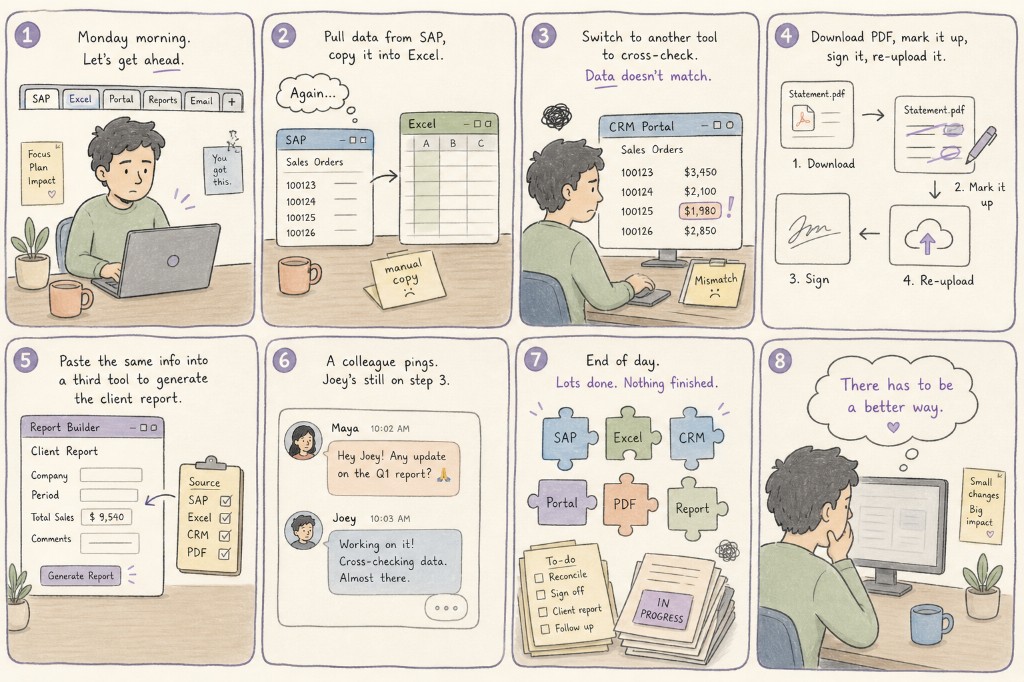
Eight-panel illustrated storyboard of Joey’s daily workflow: juggling SAP, Excel, CRM, PDF sign-off, report builder, colleague pings, fragmented tasks, and the desire for a better way.
Joey's repetitive workflow - the problem
02 • Research Overview
01Foundation
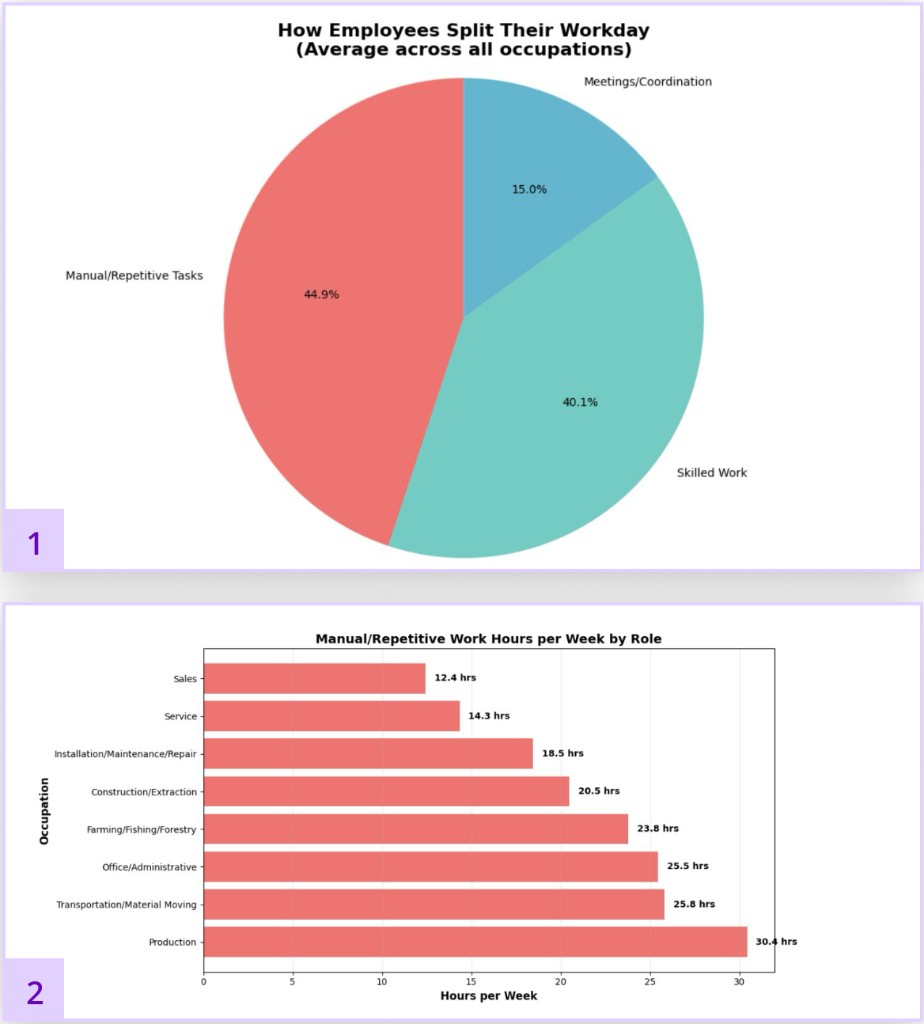
ATUS/BLS charts: how employees split their workday and manual repetitive work hours per week by role.

Secondary data analysis + competitive analysis

What we did

We used ATUS/BLS data to identify which industries carry the highest manual workflow burden, then evaluated 10 competitors to understand where existing tools fall short.

Key moment

Vercept was acquired by Anthropic the same week we downloaded it. That made the pace of this industry very concrete.

Decision it drove

We scoped to SMB employees in high-manual-workflow industries and moved away from designing for executives. The data told us where the real gap was.

02Grounding
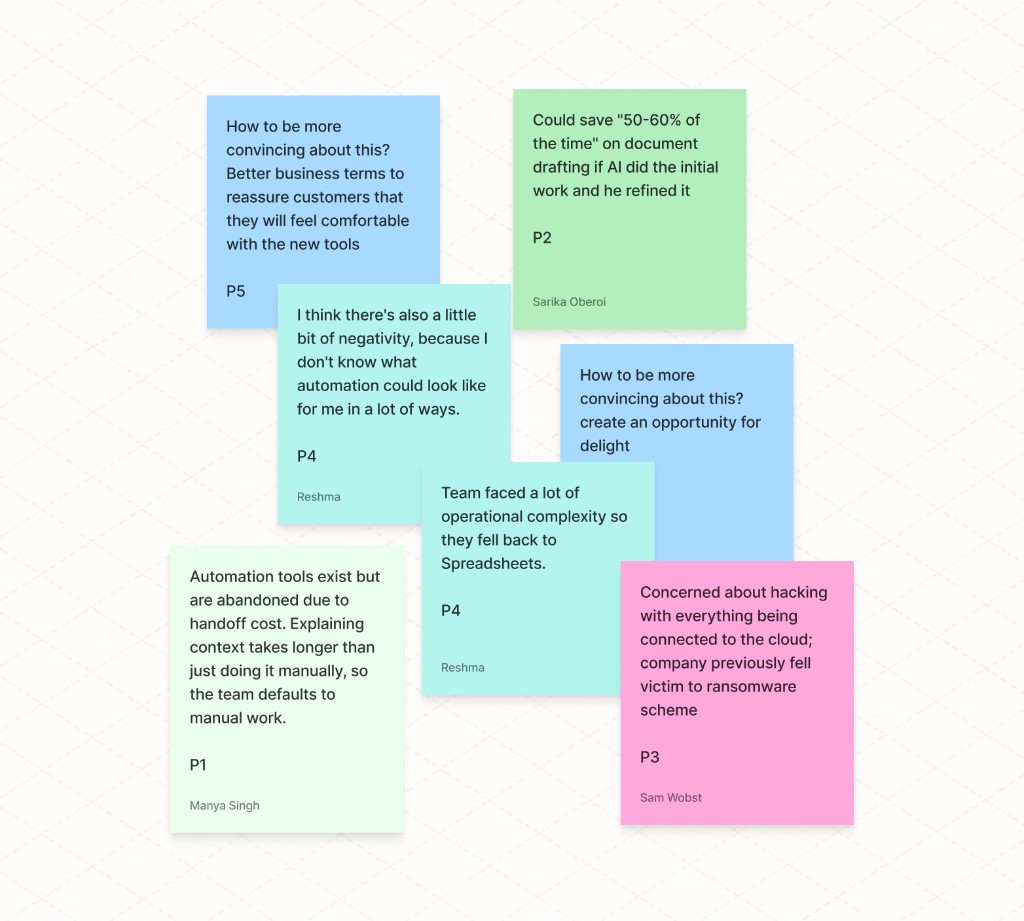
Affinity mapping notes from user research sessions — clustered themes and participant insights across diverse industries.

6 participants across diverse industries

What we did

We recruited across industries intentionally, our target user wasn't one type of worker. We looked for patterns across very different contexts.

Key moment

Every user had a completely different mental model of what automation should do for them. That range was the core design challenge.

Decision it drove

We shifted our research questions entirely to the employee side, focusing on trust and control rather than metrics and executive dashboards.

03Validation
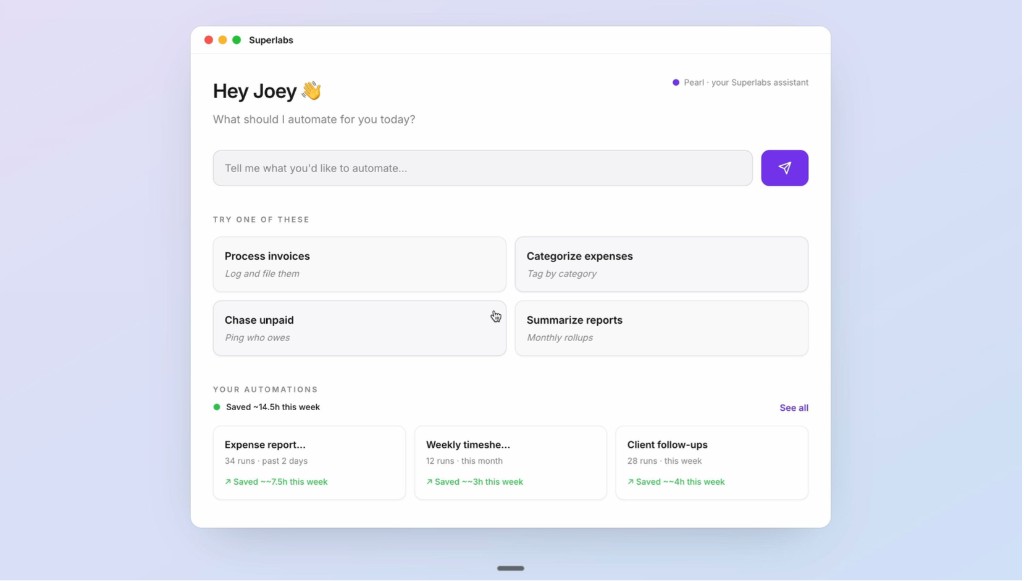
Superlabs validation prototype dashboard: Hey Joey greeting, automate prompt, suggested task cards, and automation stats showing time saved.

Usability testing + prototyping

What we did

We built two prototypes at opposite ends of a spectrum — one minimal, one familiar — and tested both to see where users actually land.

Key moment

Nobody landed cleanly on either end. Users wanted the control of one and the simplicity of the other.

Decision it drove

We combined both directions into one final prototype with full visual polish and design system consistency, grounded in what users showed us.

In Depth

03 • Design Question

Q. How might we make workflow documentation feel approachable to non-technical users?

Q. How do we design a capture experience that feels observable, not surveilled?

04 · Testing adoption signals

We built two working prototypes in Cursor and tested the extremes.

Prototype A

ambient, minimal

Favored by participants who wanted automation to feel like a quiet copilot—until something broke and they hunted for where Latch was “looking.”

Tension · Legibility vs. calm

Prototype B

Zoom-like, explicit control

Preferred when participants wanted theatrical clarity—clear modes, obvious boundaries—at the cost of feeling “always on stage” during sensitive screens.

Tension · Performance anxiety

Adoption testing - A
Adoption testing - B

Users didn't fall cleanly on either end.

So, we merged them into one direction, keeping the restraint of A and the legibility of B.

05 • FEATURES

Privacy

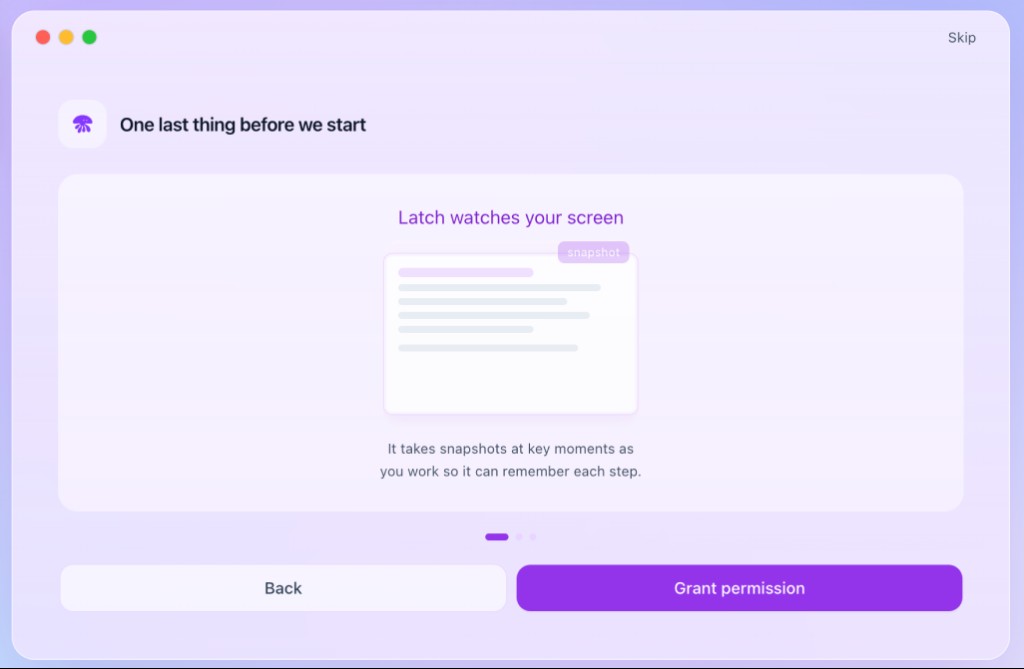
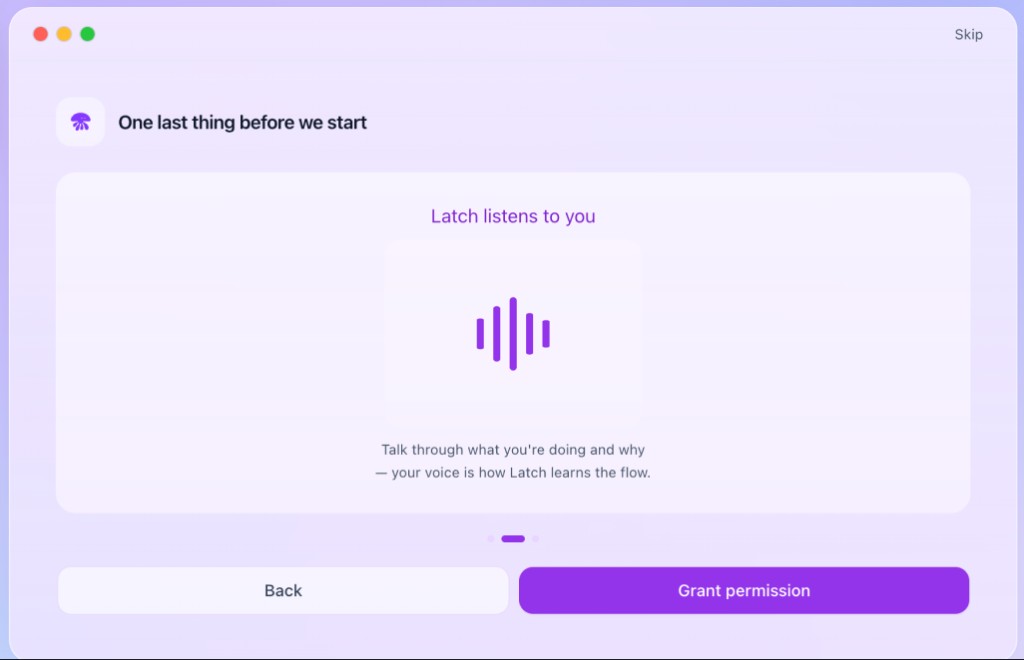
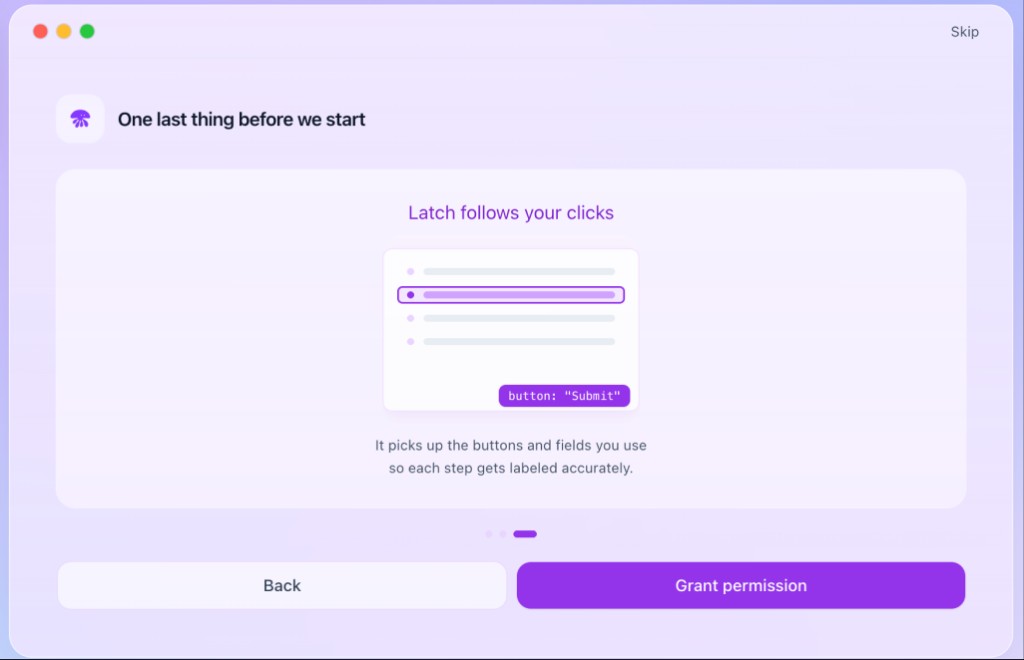
Before capture starts, users see exactly what Latch will observe — screen, voice, and clicks each get a clear consent moment so recording feels teachable, not surveilled.

DECISION: Fear of invisible observation was the biggest adoption blocker. Showing users exactly what Latch accesses before anything starts removes that barrier upfront.

Onboarding screen explaining that Latch takes screen snapshots at key moments.
Latch watches your screen

Users are wary of AI observation

Trust and transparency around data access were identified as critical barriers to adoption.

Onboarding screen explaining that Latch listens to voice narration during capture.
Latch listens to you

Modes of observation explained

Users are informed of all access permissions before recording begins.

Onboarding screen explaining that Latch tracks clicks on buttons and fields.
Latch follows your clicks

Users are in control

Users retain full control to pause or mute at any point to protect sensitive information during process automation.

Non-intrusive interface

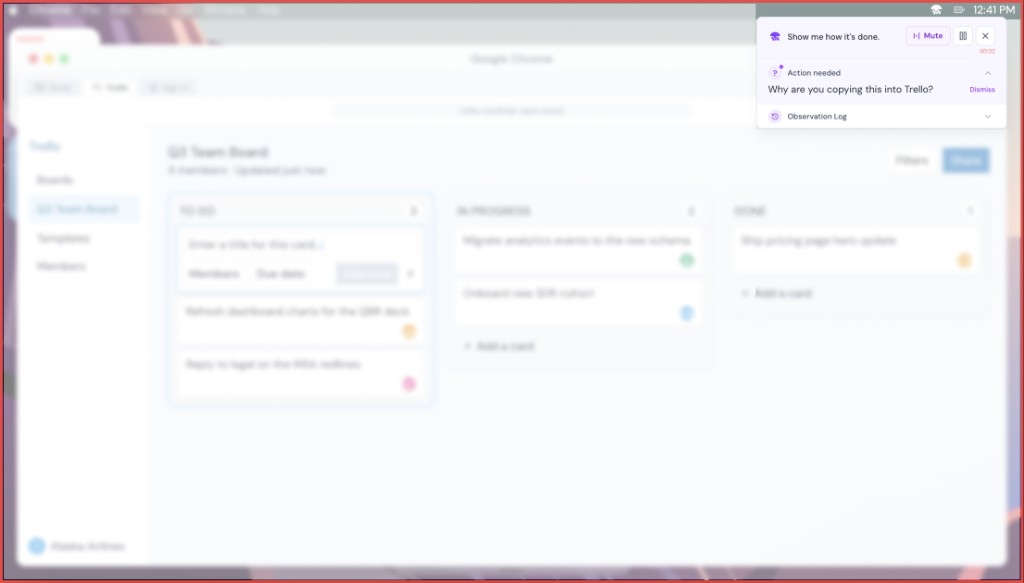
Latch compact overlay on a Trello board: draggable controls, observation log, and minimal footprint over the underlying work.
Non-intrusive interface

Stays out of your way

The controls live in a compact overlay so Latch never competes with the work happening beneath it.

Transparent by default

An observation log lets users peek at exactly what Latch is tracking at any moment. In testing, seeing the log significantly increased confidence.

Drag it anywhere

The overlay is fully draggable so it never blocks the content that matters. Users can position it wherever it's least intrusive.

Flexibility and control

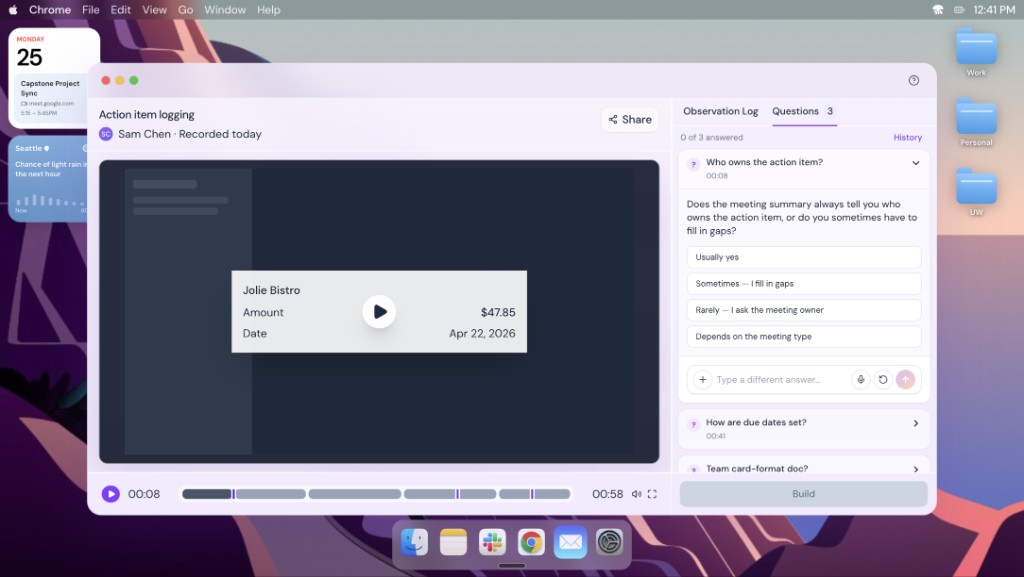
Latch action item logging UI: captured steps listed for review with options to edit, re-record, and add context before committing to automation.
Flexibility and control

Review before committing

Users needed to verify what the model captured before committing to automation.

Alignment of understanding and recording

Users wanted to revisit recordings alongside the model's interpretation of their session.

Edit, refine, make it yours

The editable review layer lets users re-record, add context, or upload supporting files.

Step 1: Workflow Capture

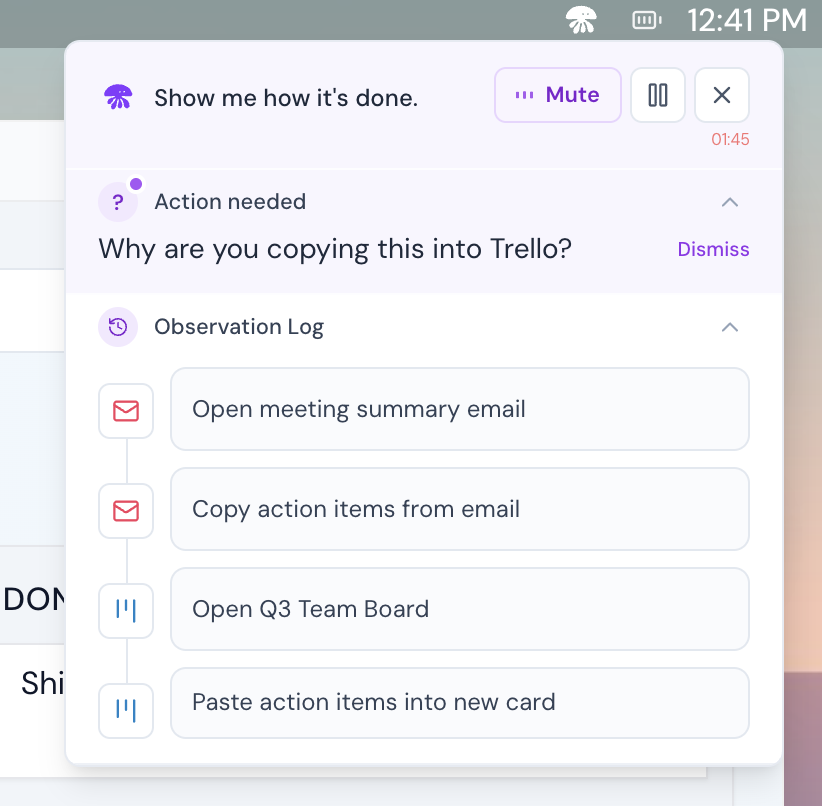
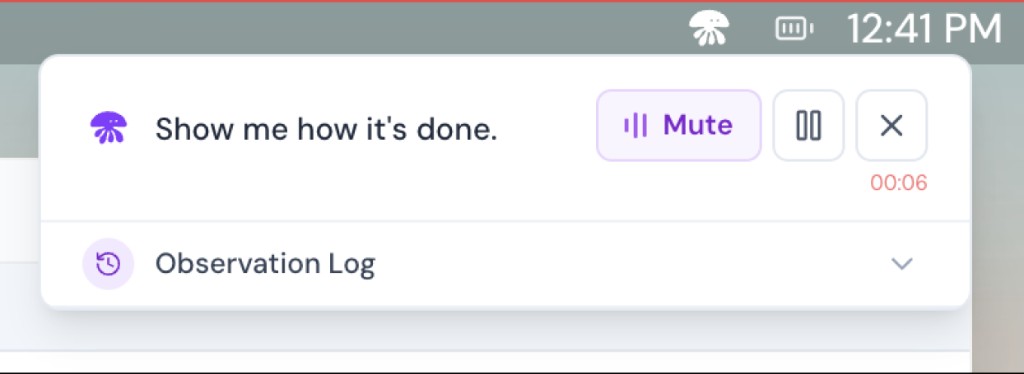
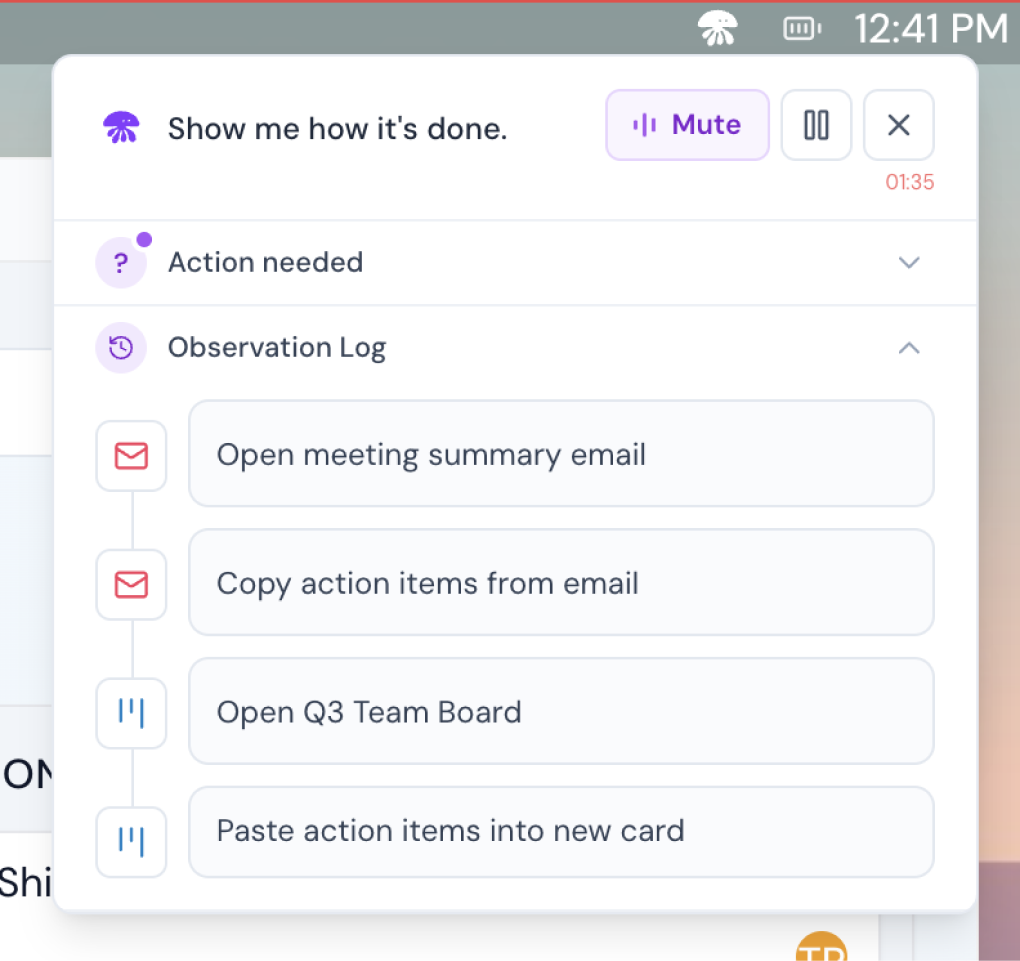
Latch floating overlay during workflow capture — show me how it's done prompt with mute, pause, timer, and observation log.
Show Latch how you work
  • Latch listens and watches simultaneously while users work normally.
  • The overlay stays compact so Latch never competes with the work happening beneath it
  • Latch notices app switches and on-screen actions, referencing them in its questions

DECISION: A floating overlay keeps the user's work primary. Latch stays peripheral, present enough to follow along, invisible enough not to interrupt.

Step 2: Follow-up

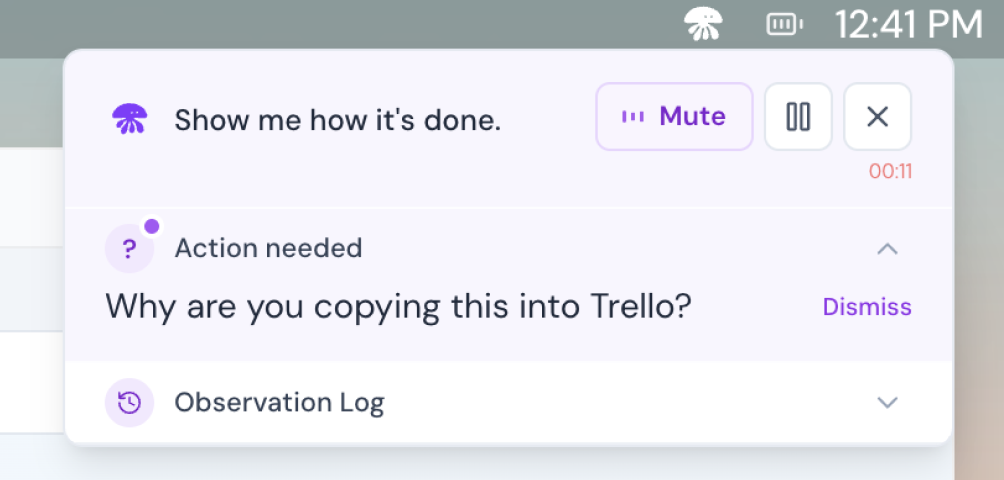
Latch follow-up prompt asking why the user is copying content into Trello, with action needed dismiss control.
Clarify without breaking flow
  • Latch asks one anchored question at a time
  • It waits for natural pauses in speech, never interrupts mid-thought

DECISION: Keeping users focused on the work, not on managing the AI.

Step 3: Revisit / Re-record

Latch observation log showing captured workflow steps from email to Trello board with expandable action history.
Correct without starting over
  • An observation log lets users see exactly what Latch tracked at any moment
  • Users can re-record, add context, or upload supporting files
  • Users can revisit recordings alongside the model's interpretation of their session

DECISION: Correcting a mistake shouldn't mean starting over. Prior context is preserved so users can fix without losing what was already captured.

Step 4: Wrap-up Summary

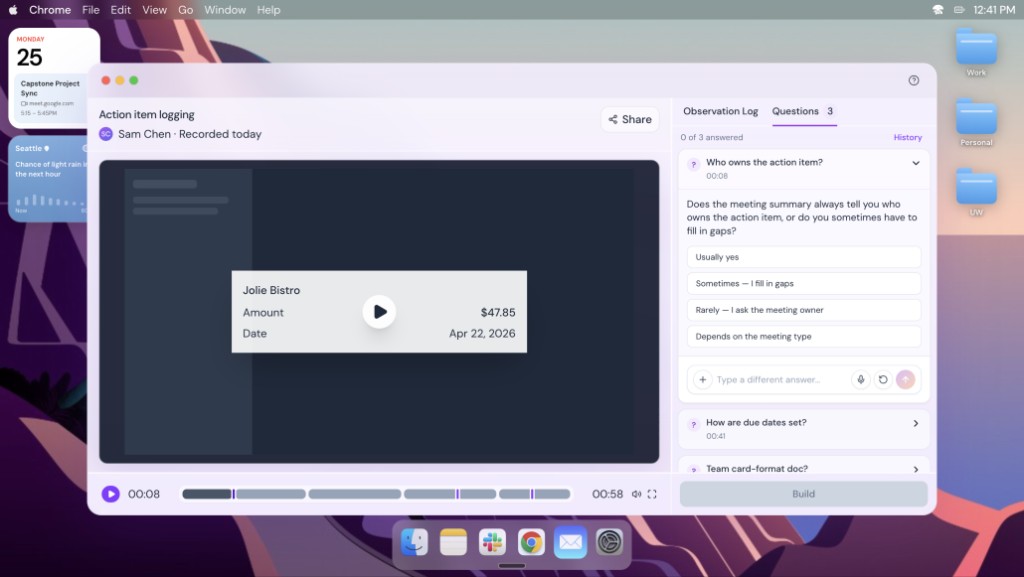
Latch wrap-up summary with video playback, observation log, deferred questions panel, and Build confirmation.
Confirm before you commit
  • Review the full recording alongside everything Latch captured before anything is built
  • Answer any questions the user skipped during recording, Latch surfaces them here so nothing is missed
  • Hit Build only when it looks right, nothing is handed off until the user confirms

DECISION: The review screen is where trust is confirmed. Typing to answer deferred questions — rather than speaking — came directly from testing feedback.

07 • Agent Behaviour

Shaping Agent Behavior

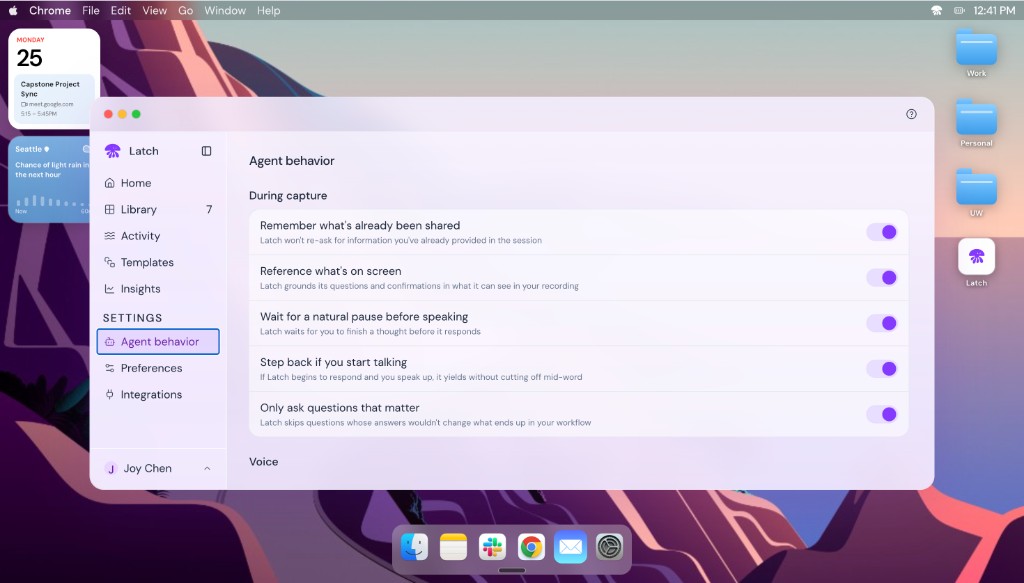
Latch agent behavior settings — during capture toggles for memory, screen context, pause timing, yield on speech, and question relevance.

Latch listens

Follows along as you record, tracking what's been covered and reflecting it back to confirm understanding.

Latch watches

Grounds itself in what's on screen, noticing when you switch views or take action to stay in context.

Latch waits

Doesn't interrupt mid-thought. It reads natural pauses in speech to confirm, recap, or ask one focused question.

Latch earns every question

Every question is tied to your workflow, probing for branches and exceptions, never filler.

Latch stays out of the way

Lives in the corner of your screen. Mute it, dismiss a question, pause for privacy, or turn it off entirely. You're always in control.

08 • Responsible AI

Responsible AI (RAI) and risk mitigation

01

Data & Surveillance Risk

Latch captures screen activity, audio, and behavioral patterns. The risk is that users in high-pressure workplaces may feel coerced into being observed.

Mitigation: explicit consent before every session, privacy pause at any moment, and no data retained beyond the active session unless the user saves it.

02

Bias in Workflow Capture

When one person's way of doing a task becomes the captured workflow, it quietly becomes the default for everyone who runs that automation after them. If that person's approach reflects individual bias or inefficiency, it scales.

Mitigation: the review step lets users challenge and edit what was captured before it's built.

03

Accountability & Automation Errors

When an automation fails, it's not always clear whether the user, the AI, or the system is responsible. Non-technical users are especially vulnerable to accepting outputs they can't evaluate.

Mitigation: every automated step is traceable, irreversible actions are flagged as manual steps, and humans remain accountable for the final output.